Check the cartridge´s model, circuit, and nozzle
Model number:
| Original Model No.(Black) | Display No. | Original Model No.(Color) | Display No. |
| PG83 | PG-83 | CL93 | CL-93 |
| PG87 | PG-87 | CL97 | CL-97 |
| PG88 | PG-88 | CL98 | CL-98 |
| PG89 | PG-89 | CL99 | CL-99 |
| PG140 | PG-140 | CL141 | CL-141 |
| PG240 | PG-240 | CL241 | CL-241 |
| PG240XL | PG-240XL | CL241XL | CL-241XL |
| PG340 | PG-340 | CL341 | CL-341 |
| PG340XL | PG-340XL | CL341XL | CL-341XL |
| PG440 | PG-440 | CL441 | CL-441 |
| PG440XL | PG-440XL | CL441XL | CL-441XL |
| PG540 | PG-540 | CL541 | CL-541 |
| PG540XL | PG-540XL | CL541XL | CL-541XL |
| PG640 | PG-640 | CL641 | CL-641 |
| PG640XL | PG-640XL | CL641XL | CL-641XL |
| PG740 | PG-740 | CL741 | CL-741 |
| PG740XL | PG-740XL | CL741XL | CL-741XL |
| PG840 | PG-840 | CL841 | CL-841 |
| PG840XL | PG-840XL | CL841XL | CL-841XL |
This tester only check original cartridges, NOT for EXTRA CHIP version
1. After power on, two languages for choice
a. Two language options: Chinese and English
b. In the first 4 seconds, every time when pressing the cartridge, it will switch between Chinese and English
The test result will display as soon as pressing the cartridge in the slot.
Right side for the black cartridge, Left side for the color cartridge.
2. Screen display (English)
Screen display for black (English version) Screen display for color (English version)
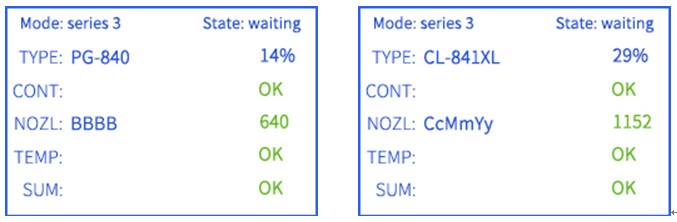
♦ The first line: Mode: Series 3 State: waiting
a: Mode: Series 3 is the Motherboard classification number (PG840/CL841 series)
b: State: Waiting means the machine is ready to work
♦ The second line: This line will show two information:
The first one: Model
a:NA: Can not recognize the right model number.
Maybe data problem or cartridge is not recognized.
b:PG-840: the current model number is PG840
c:CL-841: the current model number is CL841
The second one: ink level
100%~0%: Percentage of the remaining ink
(Such as 14% means the rest of cartridge’s ink counter is 14%)
♦ The third line: Circuit (Chip)
a:”OK”: all paths of circuits are good
b:”Fail”: Some path of circuits are not good PS: Pls surely keep the chip contact clean.
♦ The fourth line: Nozzle. This line will show two information:
The first one:Nozzle line
a: BBBB: black nozzle works well.
b: BB-B: 1 of the black nozzle is bad.
Black cartridge has four signal line to control the nozzle, display as BBBB. Example: When the electric test shows BB-B less 1 B, that means a signal line of nozzle damaged or bad contact, and so on
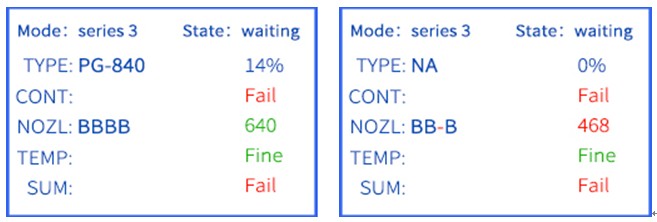
c: CCMMYY: color nozzle works well.
d: --M-YY: cyan and magenta nozzle have a problem.
The color cartridge has 6 signal lines to control the nozzle, CYM each color 2 signal lines, display on the screen as CCMMYY. Example: The electric test shows --M-YY less cyan and 1 M, it means cyan and magenta signal line damaged or bad contact, and so on.
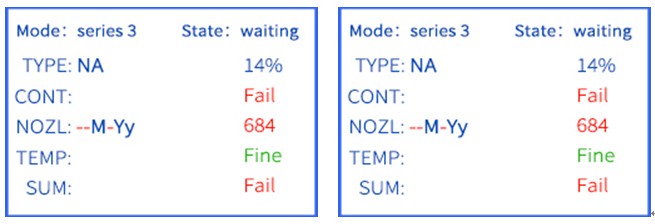
The second one: Nozzle numbers
a: 640: Qualified black nozzle numbers,
Not reach 640, that means the number of nozzles failed
b: 1152: Qualified color nozzle numbers,
Not reach 1152, that means the number of nozzles failed
♦ The fifth line: Temperature control module.
a: OK: The thermal protection component is currently working properly
b: Fail: The thermal protection component is currently working abnormally
♦ The sixth line: Result
a: OK: there is no problem with the entire test
b: NG: the front five lines must have a bad place
3. LED Light
| a: The detection is blue in progress | • |
| b: If the detection of the cartridge is no problem, that is, the sixth line (result) show OK, then the LED light green | • |
| c: If there is a problem with the detected cartridge, that is, the sixth line (result) show NG, the LED is red | • |
4. Buzzer sound to judge
a. Cartridge detection result is good, the buzzer sound 1-time
b. Poor detection result (bad), buzzer sound 3 times
5. Precautions
a. Please surely use the supplied 5V power cord; Wrong voltage powder cord will affect the test result, or even damage the cartridge.
b. The cartridge chip contact should be clean, no things block
c. Before working, please make sure all pins in the same level, without subsidence
Taiwantrade.com and iDealEZ.com uses analytical cookies and other tracking technologies to offer you the best possible user experience. By using our website, you acknowledge and agree to our cookie policy.
For more information on cookies or changing your cookies settings, read Taiwantrade & iDealEZ’s Privacy Policy.
